Absence Calendar
To register absences in Intega HR/Intega Go app, you need to create an absence calendar. The purpose of the absence calendar is to simplify the registration of vacation, illness, and other absences, so the system automatically calculates the number of absence days, taking into account Saturdays, Sundays, holidays, and any additional days off
Absence calendars can be created at three levels: Service agency (the company), Employer, and Employee. At a minimum, an absence calendar must be created at the Service agency level.
When an absence is registered in Intega HR, the system first checks if there is an absence calendar for the employee. If not, the system checks if there is an absence calendar for the employer. If not, the system finally checks the Service agency.
Create Absence Calendar at the Service agency
- Go to Settings -> Absence Calendar
- Select the Service agency
- Click on 'New'
- Enter 'From Date'. It is not necessary to fill in 'To Date'
- Click on 'Saturdays are days off' and 'Sundays are days off'
- Click on 'Add Holidays'
- Mark the relevant holidays and click Save. Continue for subsequent years
- Additional days off, such as Constitution Day, can be added by clicking on the date. Confirm 'Do you want to add a day off?' with OK
- Finish by clicking Save.
Note: If there is ongoing payroll processing or backdating, the absence calendar cannot be saved.
Example of an Absence Calendar for Service agency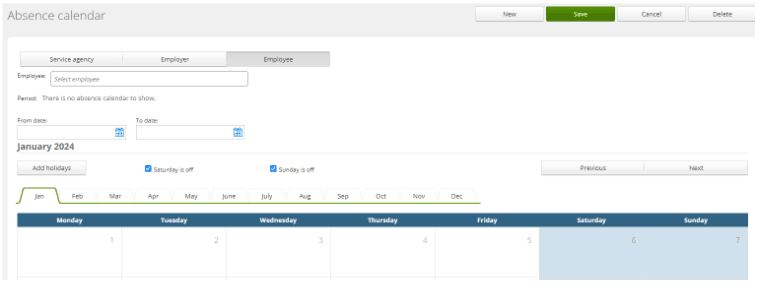
Remember to add new holidays once a year, so the absence calendar always includes holidays 1-2 years in advance.
If there is a need to create additional days off so they can be selected via 'Add holidays', the days must be created in the lookup table '120 - Holidays' under 'Settings'.
An absence calendar cannot be deleted if it has been used for absence registrations.
When creating a new period, you must first an end date to the previous period.
Create Absence Calendar for Employer
The absence calendar for the employer is created in the same way as for the Service agency.
If there are multiple employers in a Service agency, you only need to create an
absence calendar for those employers who have a different absence calendar than
the Service agency.
Create Absence Calendar for Employee
The absence calendar for the employee is created in the same way as for the Service agency. However, it is rarely necessary to create an absence calendar at the employee level.